

Google Translate មានជាភាសាខ្មែរហើយ

ក្រោមការប្រឹងប្រែងអស់រយៈពេលជាច្រើនឆ្នាំរបស់ក្រុម Developter ដ៏ចំណានៗ ទីបំផុត Google Translate មានជាភាសាខ្មែរហើយ ដែលនេះបង្ហាញពីការវិវឌ្ឍន៍ថ្មីមួយទៀតរបស់អក្សរសាស្ត្រខ្មែរ ក្នុងសម័យបច្ចេកវិទ្យាដ៏ជឿនលឿន។
នេះក៏ជាដំណឹងល្អមួយ សម្រាប់ភាសាជាតិខ្មែរ ដែលអាចប្រើកម្មវិធីបកប្រែអនឡាញ Google Translate ជាមួយនឹង font ខ្មែរយូនីកូដបាននោះ។
Cydia Tweak - Battery Doctor Pro

BatteryDoctorPro is a Cydia app for iOS, it monitors and optimizes your iPhone or iPod battery in a professional way, move important toggles and settings into Notification Center or Status Bar.
Evasi0n iOS 6.x Untethered Jailbreak updated to Fix Weather App and long reboot problems

The update will fix the weather app crashing bug and also the long reboot issue that was affecting some users after jailbreaking their iOS devices using the evasi0n jailbreak toolthat was released on Monday.
The fix is available in the form of updates to two packages on Cydia: evasi0n 6.0-6-1 Untether and UIKit Tools.
How To Fix The Weather App After Using Evasi0n

As you may be aware, the initial release of the evasi0n untethered jailbreak broke a few minor features in iOS 6, most visibly the native Weather app on the iPhone and iPod touch. Word from the developers is evasi0n’s exploit corrupted an important plist settings file for System apps like Weather, Siri, and the App Store. Lucky for our tech savvy readers, there’s an easy fix that can replace the broken plist file in minutes. The script we are working with come from pod2g himself…
While pod2g and Planetbeing have submitted an updated package to Cydia which should fix the issues with the corrupted plist file (as well as fixing a deeper issue that may have caused a noticeably long boot up sequence for some uses), you can fix the Weather issue yourself by copying a script into terminal.
If you have MobileTerminal installed, you can actually run the script straight from your device itself. Otherwise you can tunnel into your device in iFunBox, or log in through SSH.
Step 1: Copy the following script from your device’s browser:
How to Jailbreak iOS 6.1 With Evasi0n

The Evasi0n jailbreak utility has been released to provide and untethered jailbreak to all iOS 6 and iOS 6.1 devices. This is also the first jailbreak to be available for iPhone 5, making it a particularly exciting release for those who have been waiting for an iPhone 5 jailbreak.
Jailbreaking with the Evasion tool is surprisingly easy, but if you’re new to jailbroken devices and want to see how it goes we will walk through the process from start to finish. Additionally, we’ll cover a few common problems and troubleshooting solutions for some of the more frequently encountered issues.
Compatible idevices
- iPhone 3GS
- iPhone 4,4S
- iPhone 5
- iPod Touch 4th Generation
- iPod Touch 5th Generation
- iPad 2
- iPad with Retina Display 3rd and 4th Generation
- iPad Mini
ទាញយក iPhone and iPad Firmwares គ្រប់ជំនាន់

It is called firmware because it's not software (i.e., the programs that users run on the computer), but it's also not hardware (the physical objects that make up the computer).
On the iPhone, firmware is the set of operations and tools that sit between the hardware that the phone uses and software that runs on the phone. It enables features, fixes bugs, and attends to the functioning of the phone.
How to Automatically Logon To Windows 7
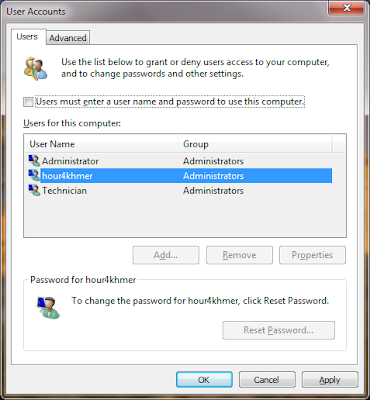
Just follow the tutorial outlined below to make Windows 7 automatically logon to your user account. When these steps are complete, Windows 7 will stop prompting for a user name and password when your computer starts up...!
របៀបបិទមិនឲ្យCopy ឯកសារតាម USB

កុំព្យូទ័រមួយចំនួនមានផ្ទុកនូវឯកសារសំខាន់ៗ ដូច្នេះប្រាកដណាស់ពេលខ្លះអ្នកប្រើប្រាស់មិនអង្គុយជាប់នឹងម៉ាស៊ីនគ្រប់ពេលទេ ហើយម្យ៉ាងក៏រឹតតែមិនចង់ឲ្យមនុស្សទីពីរ លួចចម្លងឯកសារសំខាន់ៗទាំងនោះដែរ។ ដូច្នេះដើម្បីឆ្លើយតបទៅនឹងក្ដីបារម្ភនេះ Sabay សូមលើកយកពីររបៀបការពារដោយមិនឲ្យអ្នកដទៃអាចCopy ចេញ/ចូល External Device (Flash, External HardDisk) ទិន្នន័យពីម៉ាស៊ីនកុំព្យូទ័ររបស់អ្នកបានឡើយតាមរយៈកម្មវិធី USB Block។
ចង់ដឹងធ្វើរបៀបណានោះ សូមតាមដាន និងអនុវត្តន៍តាមជំហានខាងក្រោម៖
១. ដំបូងត្រូវទាញយក និងដំឡើងកម្មវិធី USB Block ជាមុនសិន ដោយចុចលើតំណភ្ជាប់នេះ
ទាញយកដោយឥតគិតថ្លៃ ចុចទីនេះ
២. បន្ទាប់ពីបានទាញយករួច, សូមដំឡើងដោយចុចស្ដាំ mouse រួចរើសយកពាក្យ “Open” ឬ double click។ បន្ទាប់មកចុចលើប៊ូតុង Next → Next → Next → Install → Finish
៣. ក្រោយពីបានដំឡើងហើយ វានឹងបង្ហាញផ្ទាំង Get Full Version Now។ ត្រង់នេះសូមចុចលើប៊ូតុង Register។ បន្ទាប់ពីនោះនឹងបង្ហាញផ្ទាំង Enter Registration Detail មួយទៀតដើម្បីបំពេញ ដែលមានប្រអប់ Serial Number និង Registration Key។ សូមបំពេញតាម serial ដូចខាងក្រោម៖
How To Make Google Chrome browser Your Default in iOS with BrowserChooser

BrowserChooser is a new Cydia tweek from Repo Cydia, that makes Google Chrome the default browser in iOS. When you click on any link now, it'll open in the Chrome browser by default.
To install this tweek, you will need to add Source to Cydia. To do that, go to Cydia > Manage > Source and then tap on Edit followed by Add and enter this repo: repocydia.com. once it's done, you should be able to see BrowserChooser in Changes. Install the tweek, respring, then select Chrome as your default browser in Settings app. Done!
Download Google Chrome App for iPhone, iPad and iPod touch

Google chrome is my favorite web browser, you can now open and quickly switch between an unlimited number of tabs.
Enable Battery Percentage on iPod Touch 4g Running iOS 5.1.1

នៅលើឧបករណ៍ iPod Touch អត់មានកន្លែងកំណត់ការបង្ហាញថាថ្មនៅសល់ប៉ុន្មានភាគរយដូចជា iPhone, iPad នោះទេ។ ដូច្នេះបើសិនជាចង់បង្ហាញនោះ ទាល់តែឧបករណ៍ iPod Touch នោះ Jailbreak រួចរាល់ហើយ។ សូមមើលការណែនាំដូចខាងក្រោមះ
ប្រើប្រាស់កម្មវិធី iFunbox --> Root --> System --> Library --> CoreServices --> SpringBoard --> ស្វែងរកមើល file "N81AP.plist" --> click on it --> Text Viewer --> Edit --> ស្វែងរកមើលពាក្យ "gamekit" ជំនួសពាក្យ "gas-gauge-battery" --> Done.
របៀបទាញយក *.deb file ពីក្នុងទូរស័ព្ទមកទុកក្នុងកុំព្យូទ័រ

បន្ទាប់ពីទាញយកកម្មវិធីណាមួយពី Cydia និងបន្ទាប់ពីវា Install រួចហើយ វាបញ្ជាអោយយើងចុច Respring Device ឬក៏ Reboot Device ប៉ុន្តែកុំអាលចុចតាមវា ដោតទូរស័ព្ទចូល USB ដោយប្រើកម្មវិធី iFunbox រួចចូលទៅកាន់ទីតាំងដូចខាងក្រោមះ
Apple announces iOS 6: new Maps, Passbook, Siri features, Facebook, and more

During the keynote presentation for its 2012 Worldwide Developers Conference today, Apple unveiled iOS 6, the latest version of its operating system for mobile devices. Apple claims that iOS 6 has over 200 new features compared to iOS 5.
[Images] Look At These Beautiful Renders of The White iPhone 5
As if his first concept images didn’t get enough press, Martin uit Utrecht has created more beautiful artwork depicting an iPhone 5 but this time in white.
Last week Martin showed off his black rendition of what he thinks will be Apple’s new iPhone to be released later this year.

The White iPhone is shown beautifully in Rhinoceros 3D. The rendition shows a redesigned speaker grill while the headphone jack is moved to the bottom. The concept goes along with all of the leaked information regarding Apple’s new iPhone.
Would you buy this iPhone?
Last week Martin showed off his black rendition of what he thinks will be Apple’s new iPhone to be released later this year.
The White iPhone is shown beautifully in Rhinoceros 3D. The rendition shows a redesigned speaker grill while the headphone jack is moved to the bottom. The concept goes along with all of the leaked information regarding Apple’s new iPhone.
Would you buy this iPhone?
Block website មិនឲ្យបើកលើ Windows 7
មានកម្មវិធីជាច្រើនដែលអាចប្រើសម្រាប់បិទ website មិនឲ្យដំណើរការតាមពេលវេលាដែលយើងកំណត់របស់យើង។ ឥឡូវនេះ Sabay សូមលើកយកកម្មវិធីមួយមានឈ្មោះថា Focal Filter ដើម្បីធ្វើការបង្ហាញជូនមិត្តអ្នកអាននាពេលនេះ។ តែជាដំបូងយើងត្រូវមានកម្មវិធី Focal Filter នេះនៅលើម៉ាស៊ីនកុំព្យូទ័រសិនដោយគ្រាន់តែចុចលើតំណភ្ជាប់ដើម្បីទាញយកត្រង់នេះ

ក្រោយពីធ្វើការទាញយកសូមបន្តការដំឡើង រួចបើកកម្មវិធី Focal Filter ទាំងអស់គ្នាតាមជំហានខាងក្រោម៖
របៀបបិទផ្ទាំង Error លើ Windows 7
ប្រិយមិត្តប្រើកុំព្យូទ័រប្រហែលជាធ្លាប់ជួបប្រទះ កម្មវិធី error មួយចំនួនហើយ ដែល error នោះជាប្រអប់សារមួយដែលបង្ហាញក្រោយពេលយើងបិទកម្មវិធី (exit program) ដូចខាងក្រោម៖

អ្នកប្រើប្រាស់ប្រហែលជាមានការធុញទ្រាន់នឹងផ្ទាំង error ខាងលើនេះហើយតែសូមកុំបារម្ភថ្ងៃនេះ Sabay នឹងផ្ដល់ជាគន្លឹះសម្រាប់បិទផ្ទាំង error នេះ។ ងាយទេសូមធ្វើតាមជំហានដូចខាងក្រោម៖
ជំហានទី១៖ ចុចលើប៊ូតុង Start របស់ Windows រួចវាយបញ្ចូលពាក្យ “services.msc”។
Absinthe v2.0.4 Untethered Jailbreak iOS 5.1.1 (Unlock)

ប្រព័ន្ធប្រតិបត្តិការ iOS 5.1.1ជំនាន់ចុងក្រោយរបស់ក្រុមហ៊ុន Apple អាច Untethered jailbreak បានហើយបន្ទាប់ពី Haker ជនជាតិបារាំង Pod2g Chronic Dev-team iPhone Dev-team និងប្រធានក្រុមសហគមន៍ jailbreak ដទៃទៀតបានសហការគ្នាដើម្បីបង្កើតកម្មវិធីមួយដែលមានឈ្មោះថា Absinthe ជំនាន់ 2.0.4។
Absinthe v2.0.4 Untethered Jailbreak iOS 5.1.1 (Locked)

សូមអនុវត្តដូចតទៅ:
ប្រព័ន្ធដំណើរការ(Operating System) នៅលើទូរស័ព្ទ

ប្រព័ន្ធដំណើរការដែលពេញនិយម ប្រើនៅលើទូរស័ព្ទ នាពេលបច្ចុប្បន្ន មានដូចជា iOS, Android, Windows Phone, Symbian,...។ ហើយក្រុមហ៊ុននីមួយៗ ខំប្រឹង Update ប្រព័ន្ធដំណើរការ សេរីចុងក្រោយរបស់ខ្លួនដើម្បីតំរូវការ របស់អតិថិជន នាពេលបច្ចុប្បន្ន។ ប្រព័ន្ធដំណើរការ ដែលពេញនិយម មានដូចជា:
Subscribe to:
Posts (Atom)